Showing posts with label Step By Step. Show all posts

Sunday, March 2, 2014

Dinumsaurs

I just finished this piece yesterday.  Made it for my nephew's birthday present.  I think he liked it... As much as any three year old could.  He really loves those dinosaurs.

Enjoy!

Here's the original sketch concept.


Wednesday, May 1, 2013

Panthro Complete!

Finally took the time to finish this bad boy.  Although I'm not happy with the background, I'm motivated to move on to something new.  I'll plan it out better, next time!

Enjoy!!


Thursday, April 11, 2013

Panthro WIP Day 3

Just an update on the Panthro painting I was working on.  Nothing special.
I love how Instagram adds the cool filter, so I don't have to waste more time in Photoshop.

Enjoy!!

Monday, April 8, 2013

Panthro Progress

Steadily getting back into the painting and drawing groove.  Worked on this old sketch of Panthro today.  Working with some new techniques in Photoshop.  Added depth with some gradient overlays and some multiply layers for Ambient Occlusion and shadowing.
My brain is so weird at interpreting my sketches.  I have no idea how I extract the lines or the lighting scheme that I do.... So don't ask how I did it.

Enjoy!

Wednesday, August 1, 2012

BREAK!!!

So after putting in serious hours, I've finally got a little sample of what I had initially set out to produce.

Wednesday, December 14, 2011

Santa Sculpt

Just a quick wakeup sculpture from this morning.

Enjoy... With some Tunes!

Sunday, December 11, 2011

Number 9 Of 100


Steady movin' on the 100 faces.... I'll finish if it kills me!
Here's a portrait painting I did of my comedian friend Raymond. It's his Birthday today, so I whipped this one up.
Sketched in Sketchbook Pro and Painted in Painter 12.
Here's the process at 1500% speed in HD fo dat azz!
Enjoy!

Monday, November 14, 2011

Michaelangelo Madness!!!

Finished up Mike today! Went into too much detail.... It stands out from the rest a bit. But who cares! Movin' on to Leonardo!

Also, if you can tell me which movie I took the quote from, send me a message, and I'll draw you a picture of one of your favorite characters!

Enjoy!


Some Lines too!

Friday, March 18, 2011

Donatello Smash!!!


Finally finished! Took a bit more time with detail on this one.
As I began, I had a hard time with the color values, so I decided to scrap it and do a monochromatic painting and the apply color later.
I like the way it turned out. Not as much motion as the Raphael one, but still good.
Enjoy!
Some steps for you the technique


Tuesday, March 8, 2011

100th Post! Time To Party!


I love the Teenage Mutant Ninja Turtles! When I was a kid, I loved drawing my own version of them, performing random acts of violence against the Foot Clan. I loved those ultra violent comic books when I was growing up, but the Turtles I knew didn't really do that stuff.... Until now!
I'm trying to come up with a major Motion Painting that encompasses the essence of the Ninja Turtles, and is wicked awesome to look at.
This painting I worked on yesterday and today is just a concept of what I want to really paint. It's not as realistic as I imagined, but I'll save that for the final idea.

Friday, February 25, 2011

St. Patty's Day Fun_ Progress


Just working on a St. Patty's day picture. Think I'll make a sticker or business card to give out during the drunkness.

Not finished, just the progress as I go along.

Tuesday, November 9, 2010

Painting Hangups


I've been doing a lot of painting in Painter XI and have noticed a few things about how my process changes. I've tried to free my tight brush strokes to start laying on color, to make the image readable. I found laying down sloppy colors is a lot easier in Photoshop, for some odd reason. Considering I like to keep the colors tight, and almost cell shaded comic book style.
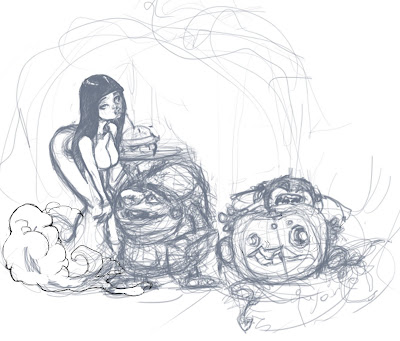
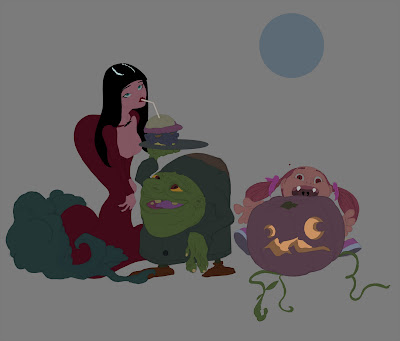
For example, in my Halloween piece, I approached it as I normally would.
Rough Sketch:
Clean Up Lines Then Flats:
Then, Tight Wad Painting:
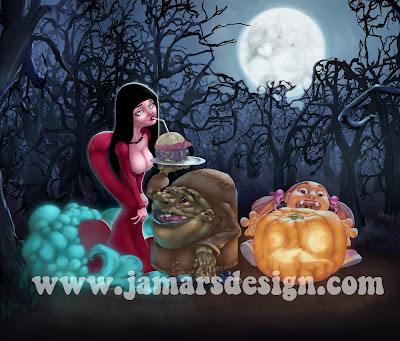
This step is very effective and not very time consuming, but effectively hinders my creative process somewhat.
I really tried to color in the lines because Painter produces weird edges when you paint on a new empty layer. Kind of adding an unwanted "Burney" effect. I have tried to find a fix for this, but have had no success. So if anyone knows what I mean and knows how to fix it, please let me know!
I didn't really have an idea of the lighting scheme, nor did I know what colors I would have used. The color scheme was a happy accident, and I'm glad it turned out the way it did.

The brushes in Painter seem to lay on the color differently, and I have been trying to create a brush that mimics the Opacity Brush in Photoshop.
By trial and error, as well as pure luck, I came up with a watercolor brush that has the natural pressure opacity that I've been looking for.
Here is some of the preliminary color sketching of my latest piece.
As you should see, the colors aren't as smooth as they normally are, and there are a lot of weird additional bounce light colors mixed in with the suit. Thanks to the new brush, I was able to achieve this effect. The polishing comes much later, when the image's lighting becomes more readable.

Sunday, March 21, 2010

Blastin' Zombie Butts... Part 2


Another drawing I did for the Zombie Killer plug. I've been trying to work the old comic style of drawing lately. Again, structure, proportions and background images are what I am trying to work on. Years ago, I used to think that,"Screw backgrounds and hair and feet! I can draw those things!" Yet I never really took the time to pay attention to them, so now I am paying for it. Although, I feel that if I can draw a pretty face and a well proportioned body, drawing perspective background images should be pretty easy. They have been so far.
With this picture, I started it out as a two inch thumbnail silhouette. I then scribbled out a basic image, much like the previous image. I have a bit of an eye for eliminating the lines that are not important. I scanned it and traced over the lines in Sketchbook pro, and traced over those again... a lot of tracing. Then the flats, and then the shadows and then the painting and then... etc.
I feel I need to post the process, because I don't do enough work that it is engraved into my brain yet. Like a drawographical log... maybe a Dlog?

Enjoy everyone!

Monday, March 15, 2010

Zombie Killin' SOB


Just finished this quick color over of a sketch I did yesterday. I got the idea from a fellow DeviantArt peer. I haven't posted much art lately, so here goes.
I scribbled together some lines in my sketchbook, then I scanned it and inked it in Sketchbook Pro. I love inking in SB pro, because I don't have to worry about smearing the ink, or running out of it. Some of the lines are difficult to execute though. Like trying to create a steady curved or oval object. It becomes shakey sometimes. I think that is because I'm so new to Digital inking, or inking in general.
Just gonna throw up each of the steps, to maintain my sanity...

Tuesday, February 23, 2010

Donatello 4 That Azz!!!

Still workin' on this Cintiq. Trying to experiment with new techniques and styles. I find I have been gravitating towards the o'l Comic style art lately. I found that inking with the Cintiq in Sketchbook Pro is pretty sweet. I figure I'll save millions of dollars on Bristol board, sketchbooks, pencils and ink in the long run. If I ever decide to go the,"All Digital" route. Looks like that is where I'm headed.

I finished this one this morning. Good o'l Donatello. This began as a little sketch I did while working at Convergys in Winnipeg. I scribbled it out and attempted to render it out, then some cock sucker supervisor decided to walk by and say," Hey! That doesn't look very productive. Should you be doing that?" Since I wasn't busy, I figured I'd draw, but I gave in and stopped, for a few seconds... I quit that job shortly after. It was pretty much a bullshit job, like all jobs that don't consist of you doing whatever you want to and getting paid for it. One day though! I just keep on truckin'!
Just Juiced up the saturation a bit on the skin to get rid of the dull feel on this one.


Now for the purpose of Blogographing, I will post my step by step process that was taken to achieve the final result. Just a basic comic book style with a painterly look. The comic style art is how I began and I seem to gravitate to it every now and then. So I guess I'm going to keep doing it until I get bored.
Enjoy!!!

Tuesday, December 15, 2009

Whoot Whoot! Finally Finished!!!

Whew!!! I was up till about six in the morning last night finishing this damn piece! The fur is what took the longest. I submitted it as soon as I finished it, not taking into consideration the minor touchups. We'll see by the end of the week if I even placed in the top three.
The topic was to draw or paint a pinup girl. I immediatly thought of that girl from the old My Pet Monster Cartoon. I think her name was Jill. Here is a detail of her.


Don't ask where the composition came from. I just scribbled it out and came up with this.


Here is the finished piece:


And a little monster


Enjoy!